Evergreen content is material that remains useful after its first publication: an explanation, a practical checklist or a clear demonstration of a recurring problem. Reusing that work can make a publishing programme more sustainable, provided the next appearance still helps the audience.
Build recycling around a maintained library rather than an endless loop of old posts. Give each item an owner, a suitable destination and a reason to return. SuSocial’s campaign controls can manage the queue, while a regular review keeps the information, creative treatment and next step worth seeing again.
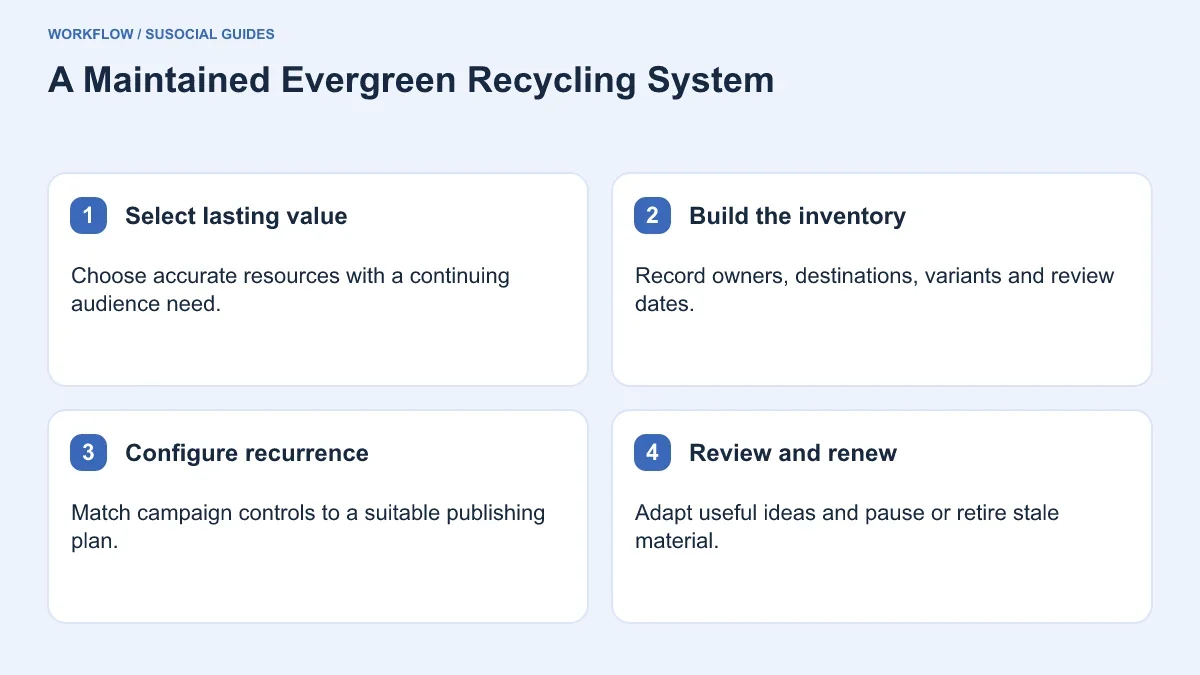
Decide what belongs in the evergreen library
Choose content whose usefulness does not depend on a short-lived event. A guide to preparing a project brief may remain relevant, while a limited promotion or a comment on yesterday’s news belongs in a different workflow.
Evergreen does not mean permanent. Product interfaces, service details and recommendations change. Classify each item by how quickly its information can become unreliable, then assign a review date appropriate to that risk.
Imagine a business selling workshop storage equipment. Its library could include measuring available space, organising frequently used tools, preparing a shared workstation and maintaining labels. A seasonal sale and a discontinued cabinet announcement should not return automatically with those guides.
Use an inclusion checklist: the advice is still correct, the business has the right to reuse the material, the destination remains relevant and the audience has a continuing reason to care. Reject weak items rather than filling a reservoir to meet an arbitrary count.
Store the context, not just the caption
Keep a content register containing an identifier, subject, intended audience, approved text, media location, destination, owner and next review date. Add a status such as approved, revise, paused or retired.
Record the purpose of each post. A measuring checklist might bring people to a detailed buying guide; a workstation example might help them compare layout choices. The purpose helps an editor judge whether a later variation still communicates the same useful idea.
Separate the source asset from its platform versions. A detailed diagram may need a simplified crop or a different caption in another placement. Keep those derivatives connected so a correction can be applied consistently.
Do not store every draft in the active publishing folder. Approved material should be easy to distinguish from work in progress, and retired versions should not remain available for accidental reintroduction into the queue.
Plan recurrence from library depth
Begin with the number of approved items suitable for a particular destination and the number of those items you intend to publish there. Under a simple sequential rotation, the approximate return interval is the eligible item count divided by the items used each day.
For a worked example, 72 eligible items at two items per day gives a 36-day rotation. This is an inventory calculation, not a recommendation that every audience or platform should receive that frequency. Different eligibility, random selection or destination rules can change the actual result.
Add space for new material, timely announcements and genuine interaction. A calendar filled entirely with recycled items may leave little room for what the audience needs now. Consider the total publishing experience across all campaigns serving the same account.
Review the interval against the content. A highly specific promotion-like post may feel repetitive sooner than a varied set of useful explanations. Use audience response and editorial inspection to adjust the plan instead of choosing one universal recycling period.
Configure the relevant SuSocial campaign controls
The Posts List tab guide documents Re-Add published posts to the end of the Post List. When selected, a published item moves to the bottom, creating a loop. That is an operational building block for approved evergreen work.
Start with a small reviewed list and confirm the intended order. Inspect any additional settings, including random selection and automatic list-management options, because they can change how an item returns or whether it remains available.
Use Standard Campaigns when their daily publishing timers fit the plan. Check What to Publish, Where to Publish and When to Publish together before activating the campaign. A correct caption with the wrong destination or distribution setting is still a publishing mistake.
Where exact item-specific recurrence is needed, evaluate the Scheduled Campaign workflow and its documented timers. Choose the campaign type according to the actual scheduling requirement rather than combining controls from different campaign types in one assumed setup.
Adapt the presentation when the idea returns
Reusing an idea does not require presenting it identically every time. A measuring guide can return as a checklist, a common mistake, a practical example or a short explanation of one decision. Each treatment should contribute useful emphasis rather than replace words mechanically.
For the workshop-storage example, one post might explain why door clearance matters. Another could show how to record usable wall space. A third might compare open access with enclosed storage for a particular task. These are related contributions with distinct reasons to exist.
Maintain the factual core. A new headline must not promise a capability the linked guide does not cover. An attractive image should represent the actual product or be clearly conceptual where appropriate. Keep variant identifiers in the register so the team can review the whole family.
Avoid using endless synonym combinations as a substitute for editorial variety. A different sentence can still communicate the same stale message. Review whether the audience receives another useful angle, not merely another text string.
Match reuse to the destination’s rules and expectations
Owned business pages, community discussions and answer platforms have different expectations. An evergreen resource can be relevant across them, but the publishing approach needs to suit each destination. A useful community answer should address its actual discussion, not receive a generic recycled caption.
X’s automation rules prohibit duplicative automated posts and non-API website scripting. Use a permitted publishing method and a destination-specific plan. A recycling setting in software does not itself establish that a particular platform use is appropriate.
Keep the destination eligibility decision in the register. Some items may suit a business page but not a community group. Others may require a fresh contextual explanation each time. These distinctions prevent one broad campaign from imposing the same content pattern on every audience.
Check changes to the destination before restarting a paused campaign. A group may have revised its rules, a page may have changed ownership or a resource may no longer fit the account’s purpose. The current context matters as much as the original approval.
Make maintenance part of the calendar
Assign a recurring library review separate from the publishing schedule. Inspect links, product details, images and any claims that depend on current information. Pause uncertain items until their owner resolves the issue.
Use an expiry field for content that must stop returning after a known date. Keep limited offers and event information outside evergreen loops unless a clear review prevents stale publication. Do not rely on someone remembering every dated sentence in a large queue.
When a source guide changes, find all linked variants through the content identifier. Update the creative treatment and the caption where needed, then confirm that the active queue uses the approved version. Archive the older material so it is available for reference without remaining eligible to publish.
Keep an emergency pause procedure. A product recall, unexpected service interruption or sensitive event may make otherwise routine material inappropriate for the moment. A named operator should be able to stop the relevant work promptly and record what requires review.
Measure whether recycling remains useful
Compare similar uses of content rather than raw totals alone. Note the destination, format, publication date and whether the post is a first appearance or a later treatment. Review relevant visits, useful interactions and commercial next steps according to the post’s purpose.
Do not interpret every decline as audience fatigue. Timing, creative changes, topic demand and platform distribution can also affect results. Inspect the actual content and destination before deciding whether to shorten the interval, rewrite the post or retire the idea.
Include editorial cost. Reusing a maintained guide may save production time, but checking and adapting it still requires work. Track the time needed to produce an approved variant and the amount of rework caused by outdated material.
A practical review outcome is a decision: retain, adapt, pause or retire. Keep a short reason beside each change so the next operator understands why an item was removed from circulation.
Start with a library you can supervise
Choose one audience, one suitable destination and a manageable group of genuinely useful items. Configure the campaign, inspect the first publications and review the returned queue. Confirm that the timing and distribution match the plan before expanding.
SuSocial runs as desktop software, so the application and its Windows environment need to remain available for scheduled work. Include that operating requirement in the routine, especially when using a compatible Windows VPS rather than a computer someone switches off after work.
Keep fresh contributions alongside the library. Questions from customers, product improvements and new examples should renew the content programme over time. Recycling works best when it preserves and develops useful knowledge rather than freezing the business’s voice in a permanent loop.
Questions about evergreen recycling
Can one library provide a full year of content?
It can support a calendar when there is enough useful, destination-appropriate material and regular maintenance. The necessary depth depends on cadence and variation. Plan from the actual inventory and review capacity rather than a promised number of days.
Should the highest-clicked post return most often?
Inspect why it performed well and whether the next use still fits. Repeating one winner too heavily can narrow the programme and make comparisons misleading. Maintain a balanced set of topics serving different audience needs.
What should happen to weak material?
Revise it when the idea remains valuable but the explanation or presentation is poor. Retire it when the subject no longer helps the audience or the claim cannot be supported. A smaller reliable library is easier to use confidently than a large collection of unreviewed old posts.
Leave a Reply