A holiday campaign begins long before the discount goes live and continues after the last scheduled Pin. People need time to discover ideas, compare options and decide what fits their plans. The business also needs time to prepare stock, delivery information, landing pages and accurate creative.
Automation is most useful when it carries a well-defined seasonal plan through those stages. Build the calendar from real operational dates, then prepare content that remains useful at each point. A queue full of attractive offers is fragile if nobody knows when the promises stop being true.
Work backward from the dates the business controls
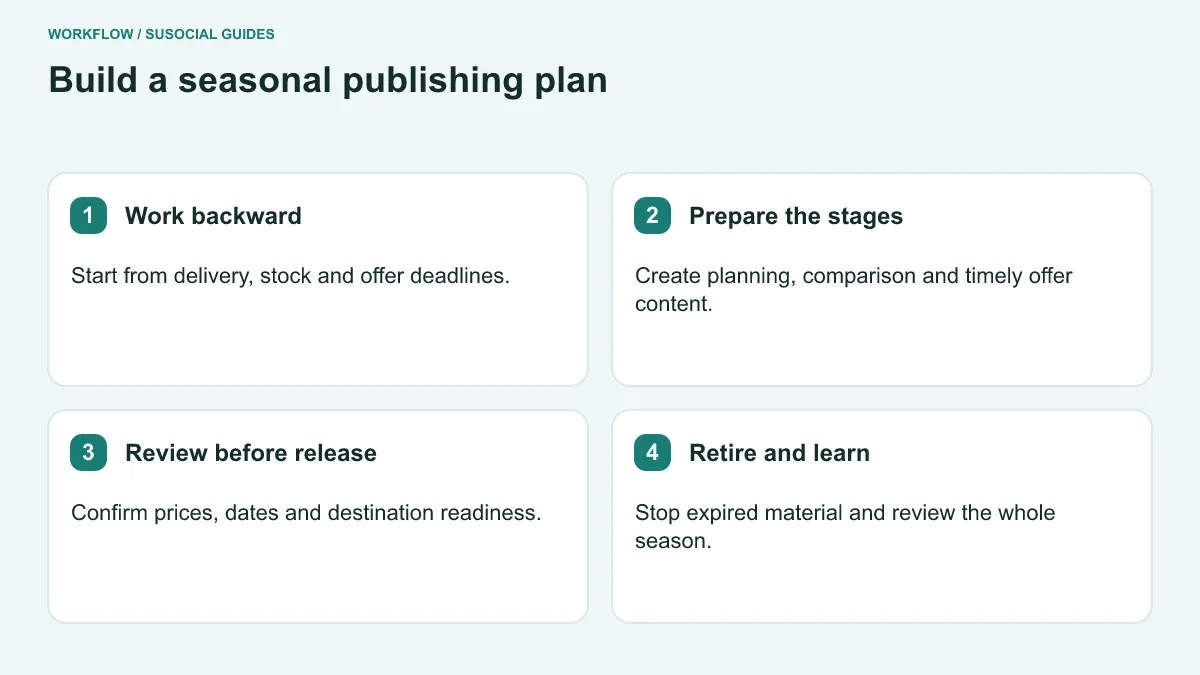
Start with stock readiness, offer start and end times, order-processing capacity and delivery cutoffs. Confirm the market and time zone for every deadline. A store serving several regions may need different promises for each destination audience.
Record who can approve changes to those dates. Marketing should not infer delivery commitments from last year’s campaign, and a designer should not invent urgency to fill a space in a template. The calendar needs an operational owner as well as a content owner.
Build in review points before material enters the queue. If a shipping cutoff changes, the team should know which images, descriptions and landing pages depend on it. Connect the date to content identifiers rather than leaving it in an isolated planning document.
For a promotion such as Black Friday, distinguish the public shopping event from your store’s actual offer. A business can choose its own campaign period, but the creative must explain the offer accurately. Do not imply a discount or deadline simply because the season makes it sound plausible.
Separate planning content from time-limited offers
Early seasonal content can help people decide what they want to do. A gift guide, room-planning idea or preparation checklist may be useful before a purchase is urgent. Later content can answer comparison and availability questions, while a dated offer requires precise maintenance.
Use a content map with three broad roles:
| Stage | Reader need | Content requirement |
|---|---|---|
| Planning | Discover a suitable idea | Clear inspiration and a useful destination |
| Choosing | Compare options and constraints | Accurate products, criteria and availability |
| Acting | Understand a current offer or deadline | Verified terms, dates and next step |
The stages do not require identical volume or fixed timing for every business. A made-to-order shop may need an earlier decision window than a downloadable-product publisher. Let fulfilment and audience behavior shape the plan.
Keep evergreen creative separate from dated creative. A general gift-wrapping tutorial can remain useful after the sale. A graphic that says an offer ends on a particular day needs a clear retirement rule. Mixing both into one undifferentiated recurring queue invites errors.
Research timing without treating a trend as a forecast
Pinterest Trends can help examine interest over time for relevant subjects and markets. Use it alongside your own sales and content history. A broad seasonal pattern can inform preparation, but it does not predict how many customers a particular campaign will produce.
Compare related questions. Someone searching for handmade gift ideas may need different content from someone comparing ready-to-ship products. The same holiday label can cover very different buying stages.
Record the research date, market and terms used. This makes the planning assumption visible when the campaign is reviewed later. Avoid turning a normalized trend line into an unsupported count of potential buyers.
Use research to decide what to prepare, not to chase every fashionable phrase. A trend that does not fit the product assortment or content expertise can consume creative time while attracting an audience the business cannot serve.
Prepare landing pages before scheduling the promotion
Open every seasonal destination on a phone. Check product availability, variants, offer terms and the route to the next action. A gift guide should help someone choose; a promotion page should explain the actual offer without making the reader hunt for exclusions.
Keep the Pin and destination aligned. If the image shows a bundle, the page should explain what the bundle contains. If the campaign targets a delivery deadline, the destination should make region-specific information accessible.
Plan what the page will show after the offer ends. A useful explanation, a current collection or an accurate archive can serve visitors arriving from older Pins. Sending everyone to an unrelated homepage can break the original promise and make the old creative confusing.
Coordinate website and creative changes. A store may update a discount automatically while an image still displays the old percentage. The campaign register should identify those dependencies so that changes reach both systems.
Build the queue in SU Social with clear boundaries
Use the Pinterest publishing features for approved seasonal material. Give campaigns recognizable names that include the brand, season and content purpose. A general “holiday” label becomes difficult to interpret when several years of work remain in the workspace.
Organize account and board selections with Destination Lists. Choose destinations that fit the content, not every available board with a seasonal word in its name. A gift guide for gardeners belongs in a different context from a generic winter decoration tutorial.
Keep time-limited material in a queue the operator can find and pause quickly. Do not rely on memory to stop recurring creative after a sale. Review the actual campaign behavior and verify how the selected scheduling options handle the end of the intended period.
If an owned blog feed supplies seasonal guides, use the RSS Posts Extractor to bring suitable text and images into drafts. Inspect old dates, embedded offers and image choices before approving extraction output for the campaign.
A worked plan: a made-to-order gift shop
Imagine a small shop selling personalized home gifts. Its main operational constraint is production time, so the team begins with the latest date it can reliably accept orders for the intended delivery window. The campaign plan is built backward from that date rather than copied from a general retail calendar.
Early creative explains personalization choices and shows what information buyers need to provide. Comparison content helps people choose between materials and sizes. Later creative describes the current order window using dates approved by the operations manager.
The editor separates the reusable gift-idea images from those containing an order deadline. Each dated asset has a review owner and a related landing page. A sample is checked on a phone before the queue is enabled.
During the campaign, demand changes the shop’s production capacity. The operations manager updates the order window, and the content owner identifies the affected queue from the register. The operator pauses the outdated assets and verifies the replacement wording before resuming.
After the cutoff, the shop can continue publishing useful planning or care content without implying that orders will arrive in the expired window. This example illustrates a coordinated seasonal process, not a claimed sales uplift.
Monitor the promises during the active period
Check the campaign’s public output and the underlying offer regularly. The appropriate frequency depends on how quickly stock and terms change. A short promotion with limited quantities needs closer attention than an evergreen seasonal tutorial.
Keep a short change log. Record what changed, when it changed and which content was affected. If a customer later encounters an older Pin, the team can understand the original promise and inspect the destination appropriately.
Maintain the Windows environment running SU Social. Scheduled operations require the application and network to remain available. Plan reboots and updates with awareness of the active campaign, and check what actually published after an interruption.
Do not automatically retry every item after a connection problem. Inspect the live account and available results first. A seasonal campaign can become repetitive quickly if already-published material is unintentionally sent again.
Retire the campaign as deliberately as you launched it
At the end of the offer, stop affected queued material and review recurring sources. Check whether an RSS template, evergreen reuse rule or shared destination list could reintroduce expired creative later.
Review the destination pages for visitors who arrive after the season. Keep relevant information accurate and make the next useful action clear. A product sold out for the season may need an explanation or a future-interest option rather than an unexplained error page.
Archive the planning record with the actual dates, approved assets and important changes. Keep reusable creative clearly distinguished from retired offers. This makes next season’s preparation easier without allowing old dates to be copied into a new campaign accidentally.
Evaluate the season as a complete journey
Use Pinterest Analytics alongside store or site reporting. Separate exposure, outbound interest and on-site actions. Include the full relevant period rather than judging only the busiest sale day.
Compare similar content roles. Planning content may assist a later decision without producing immediate orders. A time-limited offer has a different purpose and a shorter useful life. Keep paid promotion and organic publishing separate when interpreting results.
Review operating quality too: how often dates changed, how quickly the queue was corrected and whether customer questions exposed unclear information. Those lessons can improve the next season even when a headline traffic number looks satisfactory.
Keep region-specific observations separate. A campaign that serves local delivery and international shipping may encounter very different customer constraints. Record those differences before reusing the same message next year, especially when a successful local promise would be inaccurate for another market.
How early should a holiday campaign begin?
Work backward from fulfilment and audience planning needs, using relevant trend evidence and your own history. There is no single lead time suitable for every product or region.
Can seasonal content remain evergreen?
Some ideas can, especially tutorials and general planning guides. Keep them free of expired claims and review the destination before reuse. A dated offer needs a separate lifecycle.
What makes the plan ready to automate?
The dates are approved, the destinations are ready, each asset has a clear role and someone can pause or replace inaccurate material. With those foundations, scheduling supports the season’s work instead of allowing yesterday’s promise to keep publishing after the business has moved on.


Leave a Reply