PACKAGES

All packages include a 5-days FREE trial. No credit card required.

Starter

Get the ball rolling!

  • All Scheduling and Automation Features
  • 10 Social Accounts
  • Top 7 Social Media Platforms
  • Premium Customer Support
$ 29.95 /month

Regular

Our most popular plan!

  • All Scheduling and Automation Features
  • 30 Social Accounts
  • Top 7 Social Media Platforms
  • Premium Customer Support
$ 49.95 /month

Professional

Time to scale up!

  • All Scheduling and Automation Features
  • 70 Social Accounts
  • Top 7 Social Media Platforms
  • Premium Customer Support
$ 69.95 /month

* SUSocial is a Windows based social media automation software that needs to run continously on your machine to do its job. Learn more
* Need more accounts for your business? Contact us
* Prices do not include VAT

What Will You Get

SUSocial will take care of your social media so you can focus on your business

Social Media Scheduling

Schedule all your social media updates for Facebook, Twitter, Pinterest, Google+, LinkedIn and Tumblr.

Target Your Real Audience

SUSocial's advanced targeting options helps you discover all the real people, genuinely interested in your business.

Grow Your Accounts Fast & Easy

SUSocial's growth hacking tools will help you grow your accounts organically with real and enagaged followers.

Manage Multiple Accounts

Easily manage multiple accounts for your clients or your different businesses without leaving a trace.

Increased Engagement Rates

With the type of growth you will get with SUSocial you will see better engagement rates, increased website traffic and sale leads.

Premium Customer Support

You will not only work with the best customer support team in the business, but with highly trained social media experts that will help you build a game-changing business.

A LITTLE SETUP. A MORE FOCUSED WORKDAY.

Make the workspace
work for you.

Use your trial to explore a routine you can actually follow: your accounts, your content and the tools you need for the everyday work.

  1. Choose your account allowance.

    Pick the space you need in the plan selector above.

  2. Set up SU Social on Windows.

    Use your computer or a Windows VPS that meets the system requirements.

  3. Try your first focused workflow.

    Add your accounts and follow the relevant tool guides to get started.

See the installation guide
SU Social · Your Windows workspace
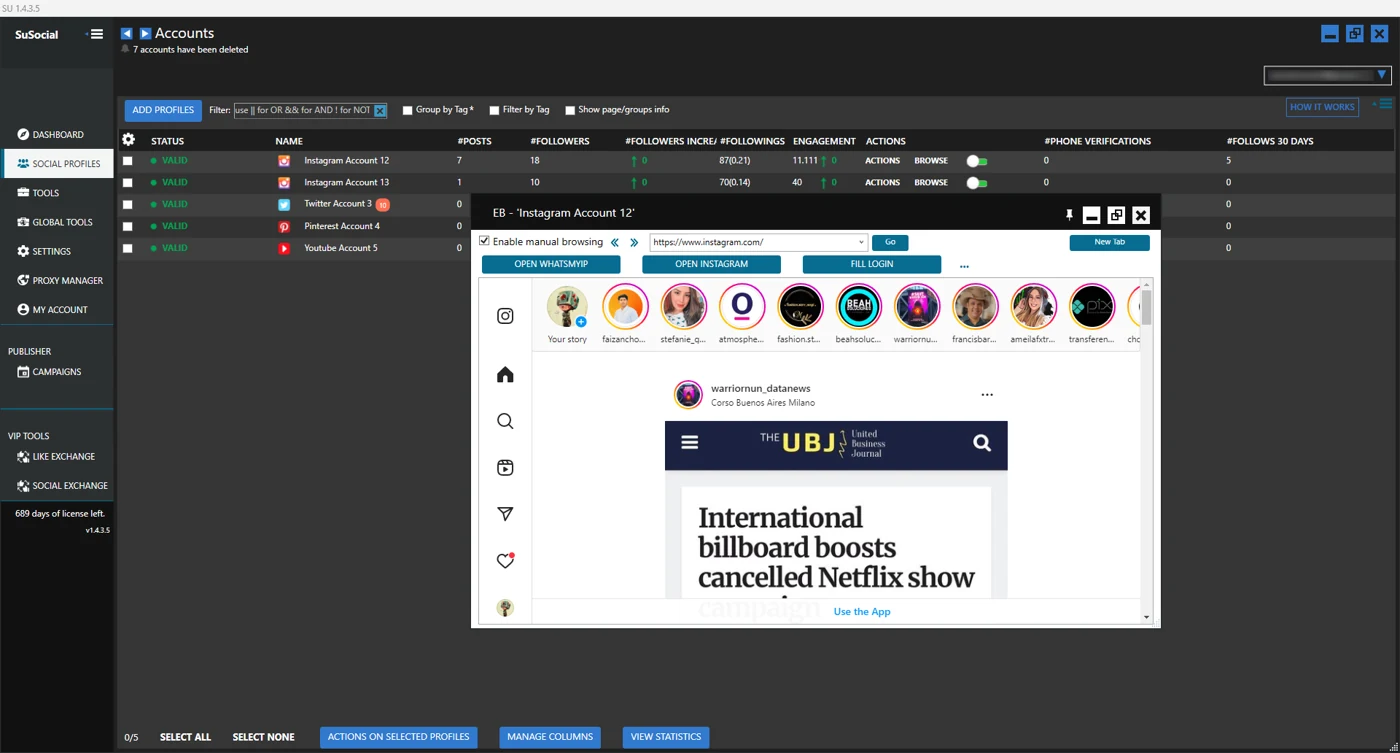
Actual SU Social desktop application showing accounts, tools and an embedded browser
Actual product viewOne place for your recurring account work.
BEFORE YOU GET STARTED

A clear plan.
A confident start.

The practical details of your trial and setup, in one place.

How long can I try SU Social before choosing a paid option?

The free trial lasts five days. Use it to explore the application and the tools that fit your accounts; the trial expires at the end of day five.

Do I need a credit card to start the trial?

No credit card is required for the five-day trial. Use the existing signup form to create your trial account.

How should I choose my social-account allowance?

Choose the total number of social accounts you want to manage: 10, 30 or 70. The allowance is for the workspace, rather than a separate limit for each platform.

Where do I see the current price for my plan?

The plan cards above show the current prices and currency using the existing pricing system. Choose the account allowance you need and review the details in the original signup flow.

What happens when the five-day trial ends?

The trial expires. If you want to continue using SU Social, choose a subscription or a one-month licence with direct payment through the existing payment flow.

What do I need to install the application?

Use Windows 10 or higher on a computer or a Windows VPS that meets the system requirements. The Knowledge Base includes the download and installation guide.

Will my tools run while the computer is switched off?

The Windows machine and SU Social need to remain running for scheduled activity and account tools to work. A Windows VPS is an option for a separate setup.

Can I get help setting up my trial workspace?

Yes. Use the installation and account guides in the Knowledge Base, or contact the support team if you need help with the setup.

YOUR NEXT WORKDAY STARTS HERE

Start with five days.
Build your own rhythm.

Explore SU Social with your own accounts and a workflow that fits the way you work.

5-day trialNo credit card requiredHelp with your setup
Choose your free trial Have a question? Contact us